



How To Open a Mazda Key Fob
Navigating the intricacies of modern car technology can be challenging, but maintaining your Mazda key fob’s functionality is crucial for your vehicle’s seamless operation. Whether you need to make a Mazda key fob battery replacement or want to understand more about your car’s remote features, our Kiefer Mazda team in Eugene, Oregon, invites you to learn how to open a Mazda key fob.
Understanding the Mazda Key Fob
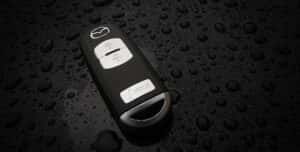
Mazda key fobs are integral to the functionality and convenience of your new Mazda vehicle, serving as the remote access point for locking, unlocking, and starting your car. Each user-friendly, secure key fob houses several essential functions, including a remote start and a panic button. Depending on usage, these fobs typically rely on a CR2025 or CR2032 lithium coin battery to function, usually lasting three to four years.
Tools You Need
Gathering the right tools before you begin ensures you can open your Mazda key fob without causing any damage. You’ll need a small or medium-sized flathead screwdriver to open the fob. We recommend covering the tip of your screwdriver with electrical or masking tape to protect the fob’s surface from scratches during this process.
You’ll also need a replacement CR2025 or CR2032 battery. These standard sizes for Mazda key fobs are readily available at most electronics stores or online retailers. Ensuring you have the correct battery type is essential, as using the wrong one can lead to poor performance or damage to the key fob’s internal circuitry.
Step-By-Step Guide
You can open your Mazda key fob with three easy steps.
Step 1: Remove the Auxiliary Key
Begin by locating the small, recessed button on the back of your Mazda key fob. This discreet button is crucial for releasing the auxiliary key. Press it firmly to eject the key, which serves a critical role, particularly in emergencies. The auxiliary key allows for manual entry into your vehicle if the main fob battery depletes unexpectedly, ensuring you’re never locked out due to a battery failure.
Step 2: Open the Case
With the auxiliary key removed, examine the key fob closely to find a small slot or opening, typically located along the seam where the two halves of the plastic casing converge. Insert the tip into the slot using your flathead screwdriver. Carefully apply a gentle amount of pressure to start prying the casing apart. Maintain a steady hand to avoid excessive force that may damage the fob.
Step 3: Gently Pry Open the Case
Once you’ve positioned the screwdriver correctly, gently twist or pry around the seam. Perform this action precisely and patiently to ensure the casing separates without damaging the internal components. The goal is to break the two halves apart without cracking the plastic or dislodging any delicate electronics inside. Take your time and proceed cautiously, as hasty movements can cause irreversible damage to your key fob.
How To Replace the Battery in Your Mazda Key Fob
A Mazda key fob battery replacement is straightforward once you’ve opened the fob. Here’s a step-by-step guide to help you through it:
- Remove the old battery: Use a screwdriver to carefully remove the old battery. Be gentle to avoid damaging any internal components within the fob.
- Install the new battery: Place the new battery into the compartment, ensuring the positive side faces up. Align the battery correctly with the contacts.
- Reassemble the key fob: Carefully align the two halves of the fob and press them firmly until you hear a distinctive click, indicating that the fob is securely closed.
By following these simple steps, you’ll ensure that your key fob remains functional and ready for use, maintaining its longevity and your connection to your vehicle’s automated features. Testing the fob from various distances is beneficial to ensure it holds a strong signal throughout. This comprehensive testing ensures your key fob is reliable and ready to perform all its functions efficiently.
Identifying When a Battery Needs Replacement
Recognizing the signs that your Mazda key fob battery needs replacement is crucial for avoiding potential inconveniences that can affect your vehicle’s functionality. One common indication is reduced signal strength. If you must press the fob multiple times or be closer to your car than usual to get a response, it’s likely a sign that the battery is nearing the end of its life. Another telltale sign is inconsistent functionality. If the fob intermittently fails to unlock the doors or start the car, this sporadic behavior can indicate that the battery power is waning and needs to be addressed promptly.
Many Mazda models have a dashboard warning system to alert you when a key fob battery is running low. This feature is invaluable, providing a direct and unmistakable signal that you need to replace the battery. Attention to these warnings can help ensure that your Mazda key fob remains reliable, keeping your vehicle’s access and ignition systems operating smoothly.
Troubleshooting Common Issues
If your key fob doesn’t work after the battery replacement, consider the following:
- Check the battery orientation: Ensure the battery is correctly placed, with the positive side up.
- Inspect for internal displacement: Make sure no internal components were dislodged during the opening.
- Clean the contacts: Dirt or debris on the battery contacts can prevent proper function.
Get Mazda Service Today at Kiefer Mazda
If you encounter difficulties or prefer professional assistance, your local Mazda service center can handle all your key fob issues. Our Kiefer Mazda technicians provide high-quality service and can ensure your key fob is in optimal working condition. For more information, call our service center at 855-207-3411 or visit us at 383 Goodpasture Island Road in Eugene, Oregon. We’re open from 7:00 a.m. to 5:30 p.m. Monday through Friday and 8 a.m. to 4 p.m. on Saturday. You can also schedule a service appointment online if needed.
Image by Scott Ritchie is licensed with CC BY 2.0 Deed
0 comment(s) so far on How To Open a Mazda Key Fob