



How to Connect Apple CarPlay to Mazda CX-5
Apple CarPlay turns your Mazda CX-5’s infotainment screen into a smart extension of your iPhone, giving you hands-free access to Apple Maps, Messages, music, and calls without picking up your phone. Whether you’re setting it up for the first time or running into connection hiccups, this guide covers everything you need to know about Mazda CX-5 Apple CarPlay, including compatibility details and step-by-step setup instructions. If you have questions along the way, our team at Kiefer Mazda in Eugene, Oregon is happy to help. Contact us anytime.
Does the Mazda CX-5 Support Apple CarPlay?
Yes, the Mazda CX-5 fully supports Apple CarPlay. Through the Mazda Connect infotainment system, your iPhone’s interface mirrors directly onto the touchscreen so you can access Apple Maps, Spotify, Messages, and calls while keeping your eyes on the road.
Which Model Years Are Compatible
CarPlay on the CX-5 starts with the 2019 model year on Touring and higher trims. The table below breaks down compatibility by year so you can quickly see where your vehicle lands.
| Model Year | CarPlay Support | Wired / Wireless | Notes |
|---|---|---|---|
| 2019 | Touring and higher trims | Wired only | Not available on base Sport trim |
| 2020–2021 | Touring and higher trims | Wired only | Standard on Touring+ |
| 2022–2023 | All trims | Wired; wireless on Grand Touring and higher | Early-build 2023 units may not have wireless – no authorized upgrade path exists |
| 2024 | All trims | Wired; wireless on Premium Plus and higher | |
| 2025 | All trims | Wired and wireless | Wireless standard on all trims |
All model years require a compatible iOS version, though iOS 13 or later gives the best experience. Wired CarPlay requires an Apple-certified Lightning cable across all compatible years, and non-certified third-party cables frequently cause connection problems.
If you’re shopping for a used CX-5 and want to confirm CarPlay support before you buy, browse our used vehicle inventory or contact us to verify the trim level.
iPhone and iOS Requirements
CarPlay works on iPhone 5 and newer, though iOS 13 or later is recommended for the best experience, including access to the CarPlay Dashboard. Siri must be enabled, since CarPlay depends on voice commands for many core functions. For wireless CarPlay, both Bluetooth and Wi-Fi need to be active on your iPhone.
What You Need Before Getting Started
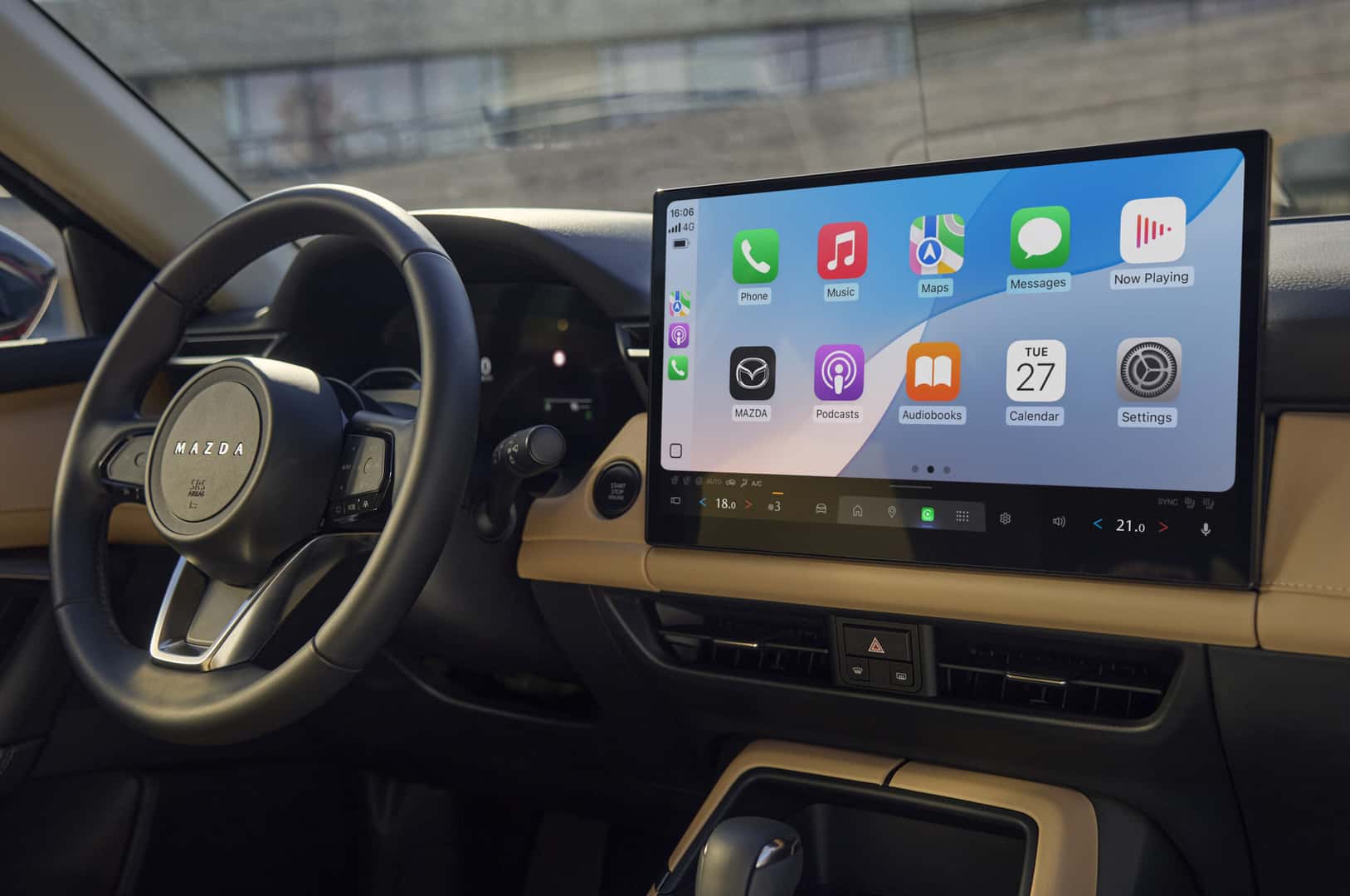
Make sure your iPhone is sufficiently charged before you begin. Low battery can trigger automatic shutdowns mid-pairing, which is frustrating. Confirm Siri is active under Settings > Siri & Search, and park your vehicle first since attempting setup while driving often results in an incomplete connection.
For wired setup, have a Lightning cable on hand and take a quick look at it for fraying or bent connectors. Damaged cables are one of the most common causes of CarPlay failing to connect, so always use an Apple-certified cable.
How to Connect Apple CarPlay via USB Cable
Wired connection is the most reliable method, and it charges your phone while you drive. The USB port for CarPlay sits in the center console and is typically marked with a phone icon.
Step-by-Step: Wired CarPlay Setup
- Start your CX-5 and wait for the Mazda Connect infotainment screen to fully load.
- Plug your iPhone into the USB port marked with a phone icon using your Apple-certified Lightning cable.
- Select “Apple CarPlay” on the infotainment display when prompted.
- Confirm or enable CarPlay if a prompt appears on your iPhone.
- The CarPlay interface will load on the display.
On a first connection, the system may take a few seconds to recognize the device. Subsequent connections are faster since the vehicle saves your iPhone’s pairing information.
How to Connect Apple CarPlay Wirelessly
Wireless CarPlay removes the need for cables entirely. Availability depends on your model year and trim: Grand Touring and higher for 2022–2023, Premium Plus and higher for 2024, and all trims for 2025. Vehicles from 2019–2021 are wired only and cannot be upgraded to wireless.
Step-by-Step: Wireless CarPlay Setup
- Confirm your vehicle supports wireless CarPlay based on the compatibility table above.
- On your iPhone, go to Settings > General > CarPlay.
- Select “Add New Car.”
- Choose Mazda CX-5 from the list of available vehicles.
- Confirm the pairing on the infotainment display when prompted.
- The system connects via Bluetooth and Wi-Fi, and the CarPlay interface launches on your display.
After the initial setup, your iPhone connects automatically each time you start the vehicle and your phone is within range. If you’re unsure whether your CX-5 supports wireless CarPlay or want hands-on help with setup, schedule a service appointment and our certified technicians can walk you through it.
Troubleshooting Apple CarPlay on Your Mazda CX-5
Most problems fall into two categories: the system not detecting CarPlay at all, or ongoing audio and connectivity drops.
CarPlay Not Showing Up or Recognized
CarPlay not detected on a wired connection: Check that your Lightning cable is fully seated in both the phone and the USB port. Try a different Apple-certified cable, since damaged or non-certified cables are the most common culprit. Confirm Siri is enabled on your iPhone, as CarPlay won’t activate without it. Restart your iPhone and, if needed, power the vehicle off and back on to reset the infotainment system.
CarPlay not connecting wirelessly: Confirm Bluetooth and Wi-Fi are both enabled on your iPhone. Try forgetting the Bluetooth pairing on both the car and the iPhone, then re-pair from scratch. Restarting the iPhone often clears up stubborn recognition issues.
iOS or infotainment software out of date: Make sure your iPhone is running iOS 13 or later for the best CarPlay experience, including access to the CarPlay Dashboard. If you’re unsure how to update your vehicle’s infotainment software, schedule a service visit and we can check it for you.
Audio Issues or Wireless Connection Dropping
Audio cutting out during a wired connection: Check that no other Bluetooth devices are active and competing for the audio channel. If you’re connected via USB and don’t need Bluetooth, disabling it on your iPhone can help.
Wireless CarPlay dropping frequently: Toggle Wi-Fi and Bluetooth off and back on. Make sure no other devices are paired to the vehicle’s Bluetooth at the same time. It’s also worth checking for pending iOS updates or Mazda Connect software updates, since both Apple and Mazda release patches that improve CarPlay stability.
If none of these steps resolve the issue, contact our service team and we can diagnose the problem directly.
Can You Add Apple CarPlay to an Older Mazda CX-5?
In November 2018, Mazda announced that owners of 2014–2018 vehicles equipped with MAZDA CONNECT could retrofit Apple CarPlay and Android Auto. If your CX-5 falls in that range and has MAZDA CONNECT, a retrofit may be possible. The 2013–2015 CX-5 models cannot be upgraded due to different infotainment hardware.
For vehicles outside the retrofit window, aftermarket head-unit replacements exist, but they require professional installation and may affect your vehicle’s warranty or resale value. For many owners, the simpler path is upgrading to a newer CX-5 with factory-supported CarPlay already built in. Browse our new inventory or certified used options to find a model year that fits. Have questions about what’s possible for your specific vehicle? Reach out to us and we’ll confirm your options.
Frequently Asked Questions About Mazda CX-5 CarPlay
Does every CX-5 have CarPlay?
No. CarPlay is available on 2019 and newer CX-5 models, starting with Touring and higher trims. Pre-2019 models don’t have native CarPlay support. If you’re unsure about a specific vehicle, check your owner’s manual or contact us to confirm.
Can I use CarPlay wirelessly in my CX-5?
Yes, if your vehicle supports it. Wireless CarPlay is available on 2022–2023 Grand Touring and higher trims, 2024 Premium Plus and higher trims, and all 2025 trims. The 2019–2021 model years are wired only.
Why isn’t CarPlay working after I connected my iPhone?
Start by checking that you’re using an Apple-certified Lightning cable, that Siri is enabled, and that your iPhone is running iOS 13 or later. For wireless connections, confirm Bluetooth and Wi-Fi are both active. A full restart of both the iPhone and infotainment system resolves most issues.
Can I add CarPlay to a 2018 CX-5?
2014 and newer CX-5 models equipped with MAZDA CONNECT may be eligible for the official Apple CarPlay retrofit. Earlier models, and any vehicle without MAZDA CONNECT, cannot be upgraded. Contact us to verify your specific vehicle’s eligibility
Does wireless CarPlay work in the US?
Yes. Wireless Apple CarPlay works in the US on compatible Mazda CX-5 trims. See the compatibility table above for details on which model years and trims support it.
Get Expert Mazda Help at Kiefer Mazda in Eugene
Our certified technicians at Kiefer Mazda in Eugene, Oregon can help with CarPlay setup, Mazda Connect troubleshooting, and retrofit questions. If you’re ready to upgrade to a CX-5 with built-in wireless CarPlay, explore our new vehicle inventory or schedule a test drive to experience it firsthand. For anything this guide didn’t cover, contact us directly and we’ll get you sorted.
Image courtesy of Mazda USA
0 comment(s) so far on How to Connect Apple CarPlay to Mazda CX-5